No contact app for iPhone
Breakup recovery app: count the days, get through the urges
Count your days without contact and without checking their profile, ride out urges with a 10-minute timer, and work through a 90-day breakup program at your own pace.

Free to download. The counters and SOS tools are free; the coach, the 90-day program and the vault need Premium.
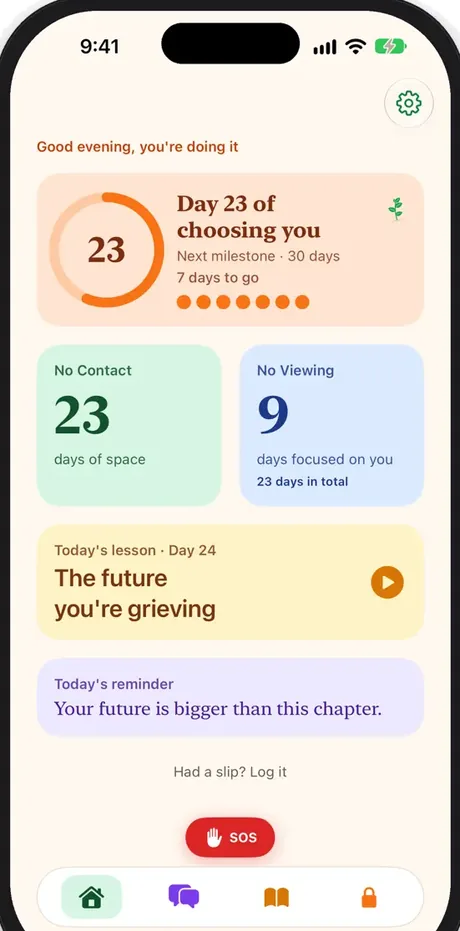
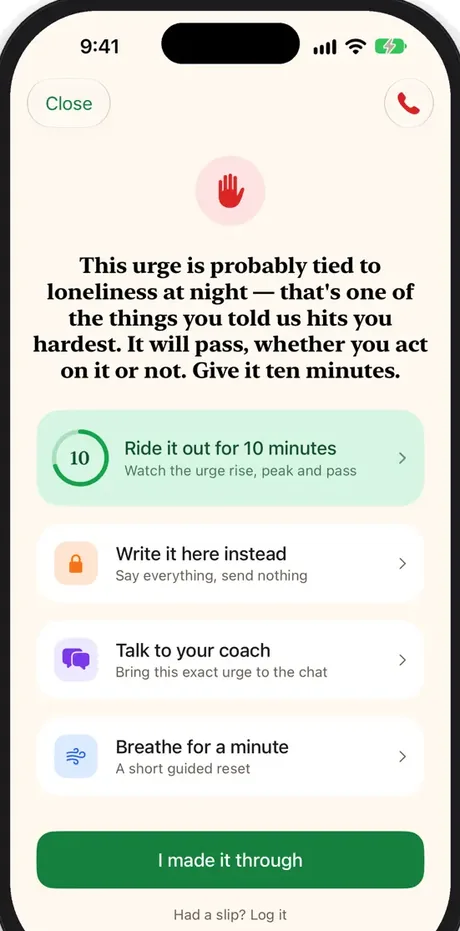
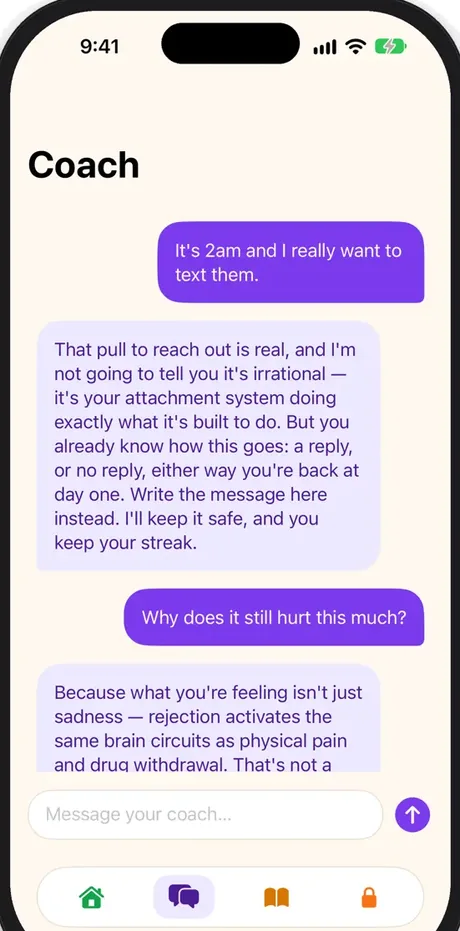
Illustration of the app flow.
- Two counters: days without contact and days without checking their profile
- Your data stays on your iPhone and your own iCloud. No account needed.
- iPhone · iOS 18 or later · 10 languages
What it is
What is No Contact: Closure?
No Contact: Closure is an iPhone app that helps people keep no contact after a breakup. It counts days without contact and without checking the ex's profile, offers an SOS button with a 10-minute urge timer and breathing exercise, a coach, a 90-day program of short daily lessons and a private vault for messages you decide not to send. It is free to download; the coach, program and vault require Premium, and the data stays on the device.
How it works
How it works
Start counting
Set the day of last contact and watch both counters grow.
Tap SOS
When the urge hits, ride it out for ten minutes or write it down instead.
Talk it through
The coach answers based on your attachment style and triggers.
What you can do
What you can do with No Contact: Closure
Two no contact counters
One counter for days without contact and one for days without checking their profile or socials. A slip resets only the streak it affects, and your total days are never erased.
SOS when the urge hits
One tap opens a 10-minute urge timer, a short breathing exercise, a place to write the message instead of sending it, and your coach. Crisis line numbers are always one tap away.
A coach that knows your patterns
A short onboarding quiz shapes how the coach answers, based on your attachment style and your hardest moments. The coach is scripted and runs on your iPhone.
A 90-day breakup program
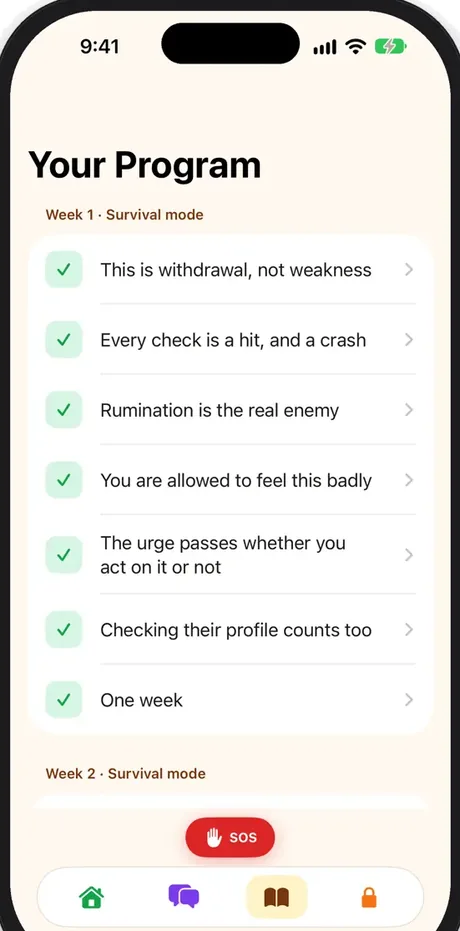
Ninety short daily lessons with a journal prompt each, from the first rough weeks to rebuilding your routine.
Why choose No Contact: Closure?
Built for the moments when keeping no contact is hardest: late at night, alone, phone in hand.
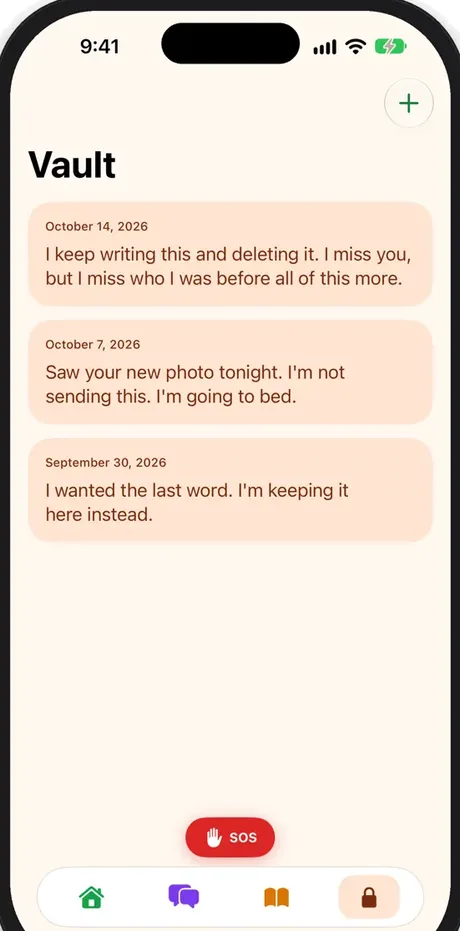
A vault for unsent messages
Write what you would have sent. It stays sealed in the app and is never sent to anyone.
Milestones, not badges
Day 1, 3, 7, 14, 30, 60 and 90 are marked quietly, and a small plant grows with your streak.
Widgets for your Home Screen
See your no contact days on the Home Screen or Lock Screen without opening the app.
Private by design
No account and no tracking. Your data stays on the device and can sync through your own iCloud.
See it in action
The facts
No Contact: Closure at a glance
| Name | No Contact: Closure (shown as No Contact on the Home Screen) |
|---|---|
| Platform | iPhone, iOS 18 or later |
| Price | Free to download. Premium unlocks the coach, the 90-day program and the vault, as a monthly subscription with a 7-day free trial or a one-time lifetime purchase. |
| Languages | 10 languages, following your device language |
| Best for | Anyone keeping no contact with an ex after a breakup, separation or divorce |
| Data and privacy | No account. Data is stored on the iPhone and can sync through the user's own iCloud. The App Store privacy label is Data Not Collected. |
Quick answers
Frequently asked questions
Is No Contact: Closure free?
It is free to download, and both counters, the SOS tools and the crisis line numbers are free to use. The coach, the 90-day program and the vault need Premium, either a monthly subscription with a 7-day free trial or a one-time lifetime purchase.
What is the no contact rule?
The no contact rule means cutting all contact with an ex for a period of time: no texts, calls, likes or checking their profile. People use it to stop the cycle of reaching out and to give themselves space to heal. The app helps you keep it by counting your days and helping in the moments you want to break it.
What happens if I break no contact?
You log it in a few seconds. Only the streak it affects restarts: checking their profile resets the viewing counter, while contact resets both. Your total days since you started stay visible, so a slip never erases your progress.
Is the coach an AI chatbot?
No. The coach is a scripted coach that runs entirely on your iPhone. It adapts its answers to your attachment style, triggers and situation from onboarding, and nothing you write is sent to a server.
Does the app replace therapy?
No. It is a self-help tool, not a medical or psychological treatment. If you are struggling to cope or thinking about harming yourself, contact a crisis line or a professional. The SOS screen has a Crisis resources button with crisis lines for 21 countries and a link to findahelpline.com for everywhere else.
Is there an Android version?
No. No Contact: Closure is designed for iPhone (iOS 18 or later); there is no Android version.
Which languages does it support?
It is available in English, German, Dutch, French, Italian, Spanish, Polish, Swedish, Norwegian and Danish, and you can switch language inside the app.
Can my ex see that I use the app?
No. There is no account, no social feature and nothing is shared. Your counters, journal and unsent messages stay on your iPhone, optionally synced through your own iCloud.

Make it through tonight
Download No Contact: Closure for iPhone. Your counters and the SOS button are free.